2025-2026 My Goal Planner
Planning isn’t just about writing dates in a calendar—it’s about designing a year that reflects your values, energy, and growth. The 2025-2026 My Goal Planner is built for people who want clarity without complexity: a flexible, editable, and print-ready system that bridges intention and action across two full years. Whether you’re launching a side hustle, returning to school, building a creative portfolio, or simply reclaiming consistency in daily life, this planner meets you where you are—not where generic templates assume you should be.
Why This Isn’t Just Another Printable Planner
Many planners promise “goal tracking” but deliver rigid layouts that crumble under real-life unpredictability. The 2025-2026 My Goal Planner avoids that trap by offering layered planning—yearly roadmaps, quarterly checkpoints, 90-day sprints, and weekly action plans—all designed to work together, not compete for attention. It includes dual-year calendars (2025 and 2026), vision board space, bucket list prompts, and even dedicated notes pages—each with intentional white space and clean typography. And because it’s built for Canva, editing isn’t a technical hurdle; it’s as simple as changing text, swapping colors, or adjusting fonts using a free account.
A Common Mistake: Assuming “Editable” Means “Truly Customizable”
Not all editable planners are created equal. Some sellers label files as “Canva-editable” but only provide low-resolution JPGs or flattened PDFs with locked layers—making real customization impossible. Others include Canva links but use non-standard dimensions, blurry assets, or missing fonts that break formatting when edited. With the 2025-2026 My Goal Planner, every page is a native Canva template at 8.5 × 11 inches, 300 DPI, no bleed. That means crisp printing, smooth drag-and-drop editing, and reliable font rendering—even on mobile devices. You won’t waste time troubleshooting alignment or pixelation before your first goal is even written down.
Overlooking Format Flexibility—and Paying for It Later
Imagine downloading a planner, printing it, and realizing the monthly spreads don’t fit your notebook size—or worse, the PDF doesn’t open properly on your tablet. That’s why this planner delivers four file formats: high-quality PDF (print-ready), JPEG (for quick digital reference), PNG (transparent-background options for overlays), and an active Canva link. You’re not locked into one use case. Need a single weekly spread as a lock screen? Use the PNG. Prepping for a team workshop? Export the vision board as a PDF and annotate live. Sharing goals with a coach? Edit directly in Canva and share the link. Format flexibility isn’t a bonus—it’s how you avoid rework, frustration, and wasted time.
Mistaking Quantity for Quality in Page Count
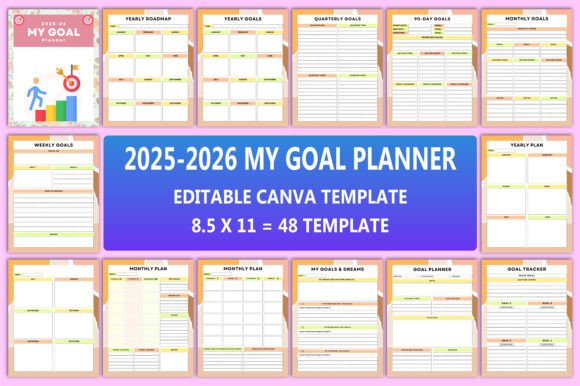
This planner includes 48 distinct Canva template pages—but what matters isn’t the number, it’s how each page serves a specific purpose. For example: the Yearly Roadmap helps you map milestones across 24 months without losing sight of seasonal rhythms. The Goal Action Plan breaks big intentions into concrete steps with deadlines, resources, and accountability prompts—not vague “do more” statements. Even the Notes pages come in two unique designs: one minimalist for quick capture, another structured for reflection or meeting summaries. When pages are purpose-built—not filler—you spend less time flipping and more time acting.
Underestimating the Power of Dual-Year Structure
Most planners cover one year. But real progress rarely fits neatly between January and December. A freelance designer might pitch Q4 2025, land a contract in November, and execute through March 2026. A teacher may plan curriculum for the 2025–2026 academic year. An entrepreneur could set Q1 2026 launch targets while reviewing 2025 metrics in December. The 2025-2026 My Goal Planner supports that continuity with seamless transitions: monthly spreads for both years, overlapping quarterly reviews, and a Belongs To page that personalizes ownership from day one. You’re not just tracking time—you’re stewarding momentum.
What to Check Before You Download or Buy
Before committing, ask yourself three things:
- Is the Canva link live and editable? Test it—open the link in Canva, try changing a headline or color, and confirm edits save without errors.
- Are file sizes consistent with quality claims? A true 300 DPI PDF for 48 pages should be >10 MB—not suspiciously tiny (a sign of compression) or impossibly large (a sign of embedded raster bloat).
- Do the layouts support your actual workflow? If you review goals weekly but rarely use daily logs, prioritize planners with strong weekly/digital-friendly views over dense daily grids.
If any of those raise red flags, pause. A well-designed planner shouldn’t require tech support or design expertise to use effectively.
Better Than “Just Getting Started”—It’s About Staying Aligned
Beginners often think goal planning is about motivation. Experienced users know it’s about structure that adapts. This planner works whether you’re refining your fifth business plan or writing your first dream list. Its strength lies in balance: enough guidance to prevent overwhelm, enough openness to honor your rhythm. The My Goals Dreams page invites imagination. The Goal Tracker adds gentle accountability. The Bucket List section reminds you that growth isn’t only measured in outputs—it’s in experiences, connections, and curiosity.
Thank you for visiting my product. If you like this product, don’t forget to visit my store for more thoughtfully designed tools that support real progress—no fluff, no friction, just clarity you can edit, print, and trust.